音源の再生
まずは、サウンドファイルの再生です。iPhone用のサウンドは、22KHzモノラルの.cafという拡張子のサウンドが推奨されているので、この形式に変換してあげる必要があります。
この場合、ターミナルを利用すると便利です。
> アプリケーション > ユーティリティ > ターミナル を開きます。
ここから、オリジナルのサウンドファイルがあるディレクトリに移動する必要があるのですが、ここではデスクトップにgroove.mp3というファイルがあることとします。
まず、以下のコマンドを実行してデスクトップに移動します。
$ cd desktop
次に、以下のコマンドを入力してリターンキーを押します。
$ afconvert -f caff -d ima4 -d LEI16@22050 -c 1 [オリジナルのサウンド] [出力用サウンド(.caf)]
ステレオにする場合は、-c 1 を削除します。
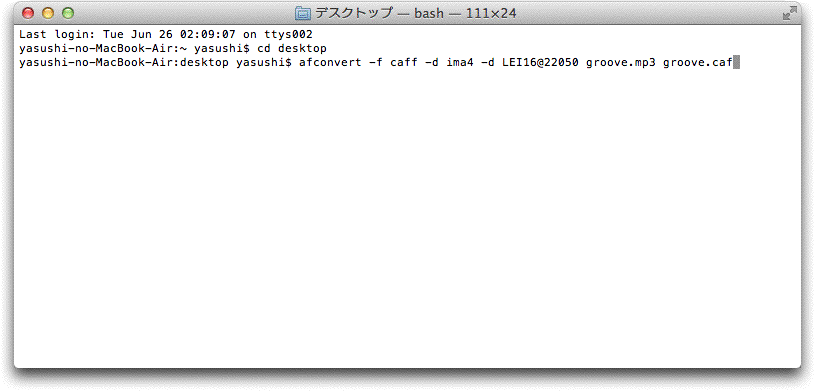
ターミナル上では以下のように見えます。問題なければデスクトップ上にgroove.cafというファイルができています。
次に、ofApp.hにofSoundPlayer型のmySoundという変数(名前は任意)を追加します。
コードは以下の通りになります。
testApp.h
#pragma once

#include "ofxiOS.h"

class ofApp : public ofxiOSApp {

    public:
        void setup();
        void update();
        void draw();
        void exit();

        void touchDown(ofTouchEventArgs & touch);
        void touchMoved(ofTouchEventArgs & touch);
        void touchUp(ofTouchEventArgs & touch);
        void touchDoubleTap(ofTouchEventArgs & touch);
        void touchCancelled(ofTouchEventArgs & touch);

        void lostFocus();
        void gotFocus();
        void gotMemoryWarning();
        void deviceOrientationChanged(int newOrientation);

	ofSoundPlayer  mySound;
};
そして、ofApp.mmのsetup()、update()、touchDown()に以下のコードを記述します。
ofApp.mm
#include "ofApp.h"

//--------------------------------------------------------------
void ofApp::setup(){
	// タッチイベントを登録
	ofRegisterTouchEvents(this);

	ofBackground(127,127,127);

	mySound.loadSound("groove.caf");	//ファイルを指定する
	mySound.setVolume(0.75f);	//ボリュームを指定する(0.0~1.0)
	mySound.setMultiPlay(false);	//複数同時に再生できないようにする
}

//--------------------------------------------------------------
void ofApp::update(){

	ofSoundUpdate(); // サウンドのシステムを更新
}

//--------------------------------------------------------------
void ofApp::draw(){
	//ofScale(appIphoneScale, appIphoneScale, 1.0);


}

//--------------------------------------------------------------
void ofApp::exit(){

}

//--------------------------------------------------------------
void ofApp::touchDown(ofTouchEventArgs &touch){

	mySound.play();	//サウンドを再生
}
コンパイルして実行してみてください。画面をクリックすると音が鳴ります。
外部からの音声入力
次は外部からの音声入力です。このコードで、例えば声に反応するアプリを作ることができます。
ofApp.h
#pragma once

#include "ofxiOS.h"

class ofApp : public ofxiOSApp {

    public:
        void setup();
        void update();
        void draw();
        void exit();

        void touchDown(ofTouchEventArgs & touch);
        void touchMoved(ofTouchEventArgs & touch);
        void touchUp(ofTouchEventArgs & touch);
        void touchDoubleTap(ofTouchEventArgs & touch);
        void touchCancelled(ofTouchEventArgs & touch);

        void lostFocus();
        void gotFocus();
        void gotMemoryWarning();
        void deviceOrientationChanged(int newOrientation);

	//ここから以下の関数と変数を追加
	void audioIn( float * input, int bufferSize, int nChannels );

	int		initialBufferSize;
	int		sampleRate;
	float buffer[512];	//iniinitialBufferSizeの値と同じサイズの配列

};
ofApp.mm
#include "ofApp.h"

//--------------------------------------------------------------
void ofApp::setup(){

	// タッチイベントの登録
	ofRegisterTouchEvents(this);

	ofxiOSSetOrientation(OFXIOS_ORIENTATION_LANDSCAPE_RIGHT);

	ofBackground(255,255,255);

	//バッファのサイズは512でないとシミュレーターが動かないらしいので、この値は変更しない
	initialBufferSize = 512;
	sampleRate = 44100;

	// 0 出力チャンネルの個数,
	// 1 入力チャンネルの個数
	// 44100 サンプルレート
	// 512 バッッファサイズ
	// 4 レイテンシー(遅延)
	ofSoundStreamSetup(0, 1, this, sampleRate, initialBufferSize, 4);
	ofSetFrameRate(60);
}

//--------------------------------------------------------------
void ofApp::update(){

}

//--------------------------------------------------------------
void ofApp::draw(){

	// 波形を描く:
	ofSetHexColor(0x000000);	//黒

	for (int i = 0; i < initialBufferSize; i++){
		//バッファは512で画面横幅が1024なので、x座標を2倍すると画面の両端に波形が表示される
		ofLine(i*2,ofGetHeight()/2,i*2,ofGetHeight()/2+buffer[i]*100.0f);
	}
}

//--------------------------------------------------------------
void ofApp::audioIn(float * input, int bufferSize, int nChannels){

	// 音を配列bufferに分割する
	for (int i = 0; i < bufferSize; i++){
		buffer[i] = input[i];
	}
}
波形の生成と出力
次は、サイン波をプログラムで生成して出力する方法です。
ofApp.h
#pragma once

#include "ofxiOS.h"

class ofApp : public ofxiOSApp {

    public:
        void setup();
        void update();
        void draw();
        void exit();

        void touchDown(ofTouchEventArgs & touch);
        void touchMoved(ofTouchEventArgs & touch);
        void touchUp(ofTouchEventArgs & touch);
        void touchDoubleTap(ofTouchEventArgs & touch);
        void touchCancelled(ofTouchEventArgs & touch);

        void lostFocus();
        void gotFocus();
        void gotMemoryWarning();
        void deviceOrientationChanged(int newOrientation);

	float pan;
	int sampleRate;
	float volume;

	float * lAudio;
	float * rAudio;

	//------------------- for the simple sine wave synthesis
	float targetFrequency;
	float phase;
	float phaseAdder;
	float phaseAdderTarget;
	int initialBufferSize;
};
ofApp.mm
#include "ofApp.h"

//--------------------------------------------------------------
void ofApp::setup(){

	// IMPORTANT!!! if your sound doesn't work in the simulator - read this post - which requires you set the output stream to 24bit
	//	http://www.cocos2d-iphone.org/forum/topic/4159

	// register touch events
	ofRegisterTouchEvents(this);

        ofxiOSSetOrientation(OFXIOS_ORIENTATION_LANDSCAPE_RIGHT);

	ofBackground(255,255,255);

	// 2 出力チャンネルの個数,
	// 0 入力チャンネルの個数
	// 44100 サンプルレート
	// 512 バッッファサイズ
	// 4 レイテンシー(遅延)

	sampleRate = 44100;
	phase = 0;
	phaseAdder = 0.0f;
	phaseAdderTarget = 0.0;
	volume = 0.15f;
	pan = 0.5;

	//バッファのサイズは512でないとシミュレーターが動かないらしいので、この値は変更しない
	initialBufferSize = 512;

	lAudio = new float[initialBufferSize];	//左の音声用変数
	rAudio = new float[initialBufferSize];	//右の音声用変数

	memset(lAudio, 0, initialBufferSize * sizeof(float));	//メモリのサイズ確保
	memset(rAudio, 0, initialBufferSize * sizeof(float));

	//we do this because we don't have a mouse move function to work with:
	targetFrequency = 444.0;
	phaseAdderTarget = (targetFrequency / (float) sampleRate) * TWO_PI;

	ofSoundStreamSetup(2, 0, this, sampleRate, initialBufferSize, 4);
	ofSetFrameRate(60);

}

//--------------------------------------------------------------
void ofApp::update(){
}

//--------------------------------------------------------------
void ofApp::draw(){

	ofSetHexColor(0x000);
	for (int i = 0; i < initialBufferSize; i++){
		ofLine(i*2, ofGetHeight()/4, i*2, ofGetHeight()/4 + lAudio[i]*200);
	}

	ofSetHexColor(0x000);
	for (int i = 0; i < initialBufferSize; i++){
		ofLine(i*2, ofGetHeight()/4*3, i*2, ofGetHeight()/4*3 + rAudio[i]*200);
	}
}

//--------------------------------------------------------------
void ofApp::audioOut( float * output, int bufferSize, int nChannels ){

	float leftScale = 1 - pan;
	float rightScale = pan;

	// sin (n) seems to have trouble when n is very large, so we
	// keep phase in the range of 0-TWO_PI like this:
	while (phase > TWO_PI){
		phase -= TWO_PI;
	}

	phaseAdder = 0.95f * phaseAdder + 0.05f * phaseAdderTarget;
	//phaseAdder = 1.0f;
	for (int i = 0; i < bufferSize; i++){
		phase += phaseAdder;
		float sample = sin(phase);
		lAudio[i] = output[i*nChannels    ] = sample * volume * leftScale;
		rAudio[i] = output[i*nChannels + 1] = sample * volume * rightScale;
	}

}